-
Make "boot_os" folder on C: (you may change to other
driver)
-
Insert Windows 98 installation CD into CD/DVD-ROM
-
Export bootable information from Window 98 installation
CD to c:\boot_os\boot98.bif
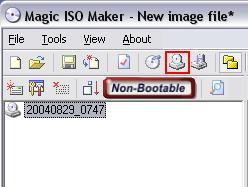
1. Click "Make CD/DVD image file from CD/DVD-ROM " button to open "make
iso from cd-rom" dialog
2. Choose CD-ROM, Input the output file name and choose "export boot
image" option.
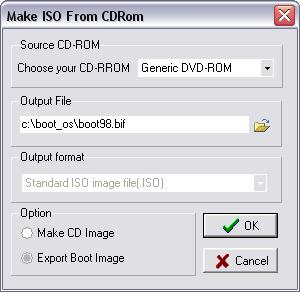
3. Click OK.
-
Insert Windows ME installation CD into CD/DVD-ROM
-
Export bootable information from Window ME installation
CD to c:\boot_os\bootme.bif
-
Insert Windows NT 4.0 installation CD into CD/DVD-ROM
-
Export bootable information from Window NT4.0
installation CD to c:\boot_os\bootnt.bif
-
Insert Windows 2000 professional installation CD into
CD/DVD-ROM
-
Export bootable information from 2000 professional
installation CD to c:\boot_os\boot2k.bif
-
Insert Windows XP installation CD into CD/DVD-ROM
-
Export bootable information from Window XP installation
CD to c:\boot_os\bootxp.bif
-
Insert Windows 2003 installation CD into CD/DVD-ROM
-
Export bootable information from Window 2003
installation CD to c:\boot_os\boot2k3.bif
