|
|
|
Create Windows
98/ME/NT/2K/XP/2003 all in one installation DVD |
| |
|
Create Windows 98/ME/NT/2K/XP/2003 all in one
installation DVD
Continues.. Page 5 |
|
|
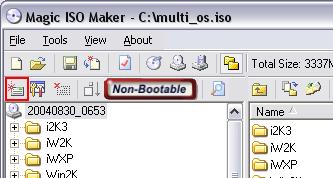
6. Apply multi-boot image file into DVD
image file
|
|
-
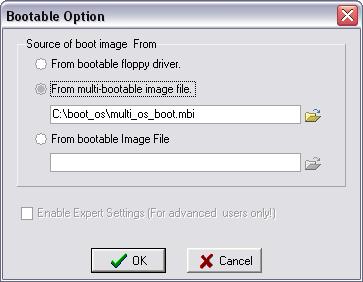
Choose "From multi-bootable image file" option, and
input "c:\boot_os\multi_os_boot.mbi"
-
Click "OK' to apply.
-
Click
 button to
save c:\multi_os.iso button to
save c:\multi_os.iso
|
|
|
7. Burn ISO to DVD
-
Because multi_os.iso is larger than the capacity of CD.
So we have to burn multi_os.iso onto DVD. Please place DVD-R, DVD-R/RW,
DVD+R or DVD+R/RW into your DVD recorder.
-
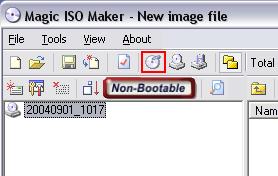
Click
 button to
open "Burn CD!" Dialog button to
open "Burn CD!" Dialog
-
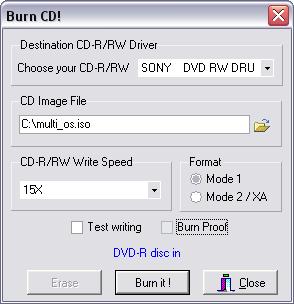
Choose your DVD recorder, the CD/DVD image file, and
other parameters.
|
|
-
-
Click "Burn It" to start
-
Finish
|
|
|
<<
[1]
[2]
[3]
[4] 5
>> |
|
|