-
Open c:\multi_os.iso with MagicISO.
-
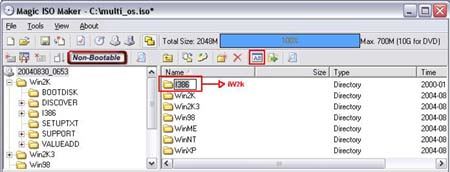
Copy the folder "\Win2K\i386" to "\iW2K".
1. Hold the CTRL key down, and use mouse to drag folder "\Win2K\i386" to
root.
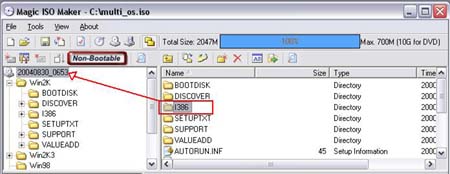
2. Click
 button
to rename i386 to iW2K.
button
to rename i386 to iW2K.
-
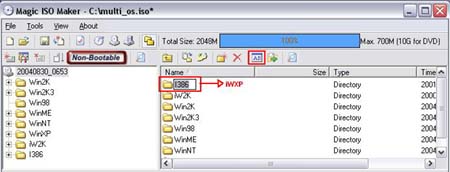
Copy the folder "\WinXP\i386" to "\iWXP".
1. Hold the CTRL key down, and use mouse to drag folder "\WinXP\i386" to
root.
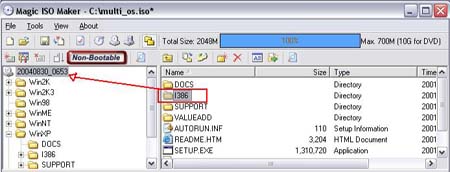
2. Click
button
to rename i386 to iWXP.
-
Copy the folder "\Win2K3\i386" to "\i2K3".
1. Hold the CTRL key down, and use mouse to drag folder "\Win2K3\i386"
to root.
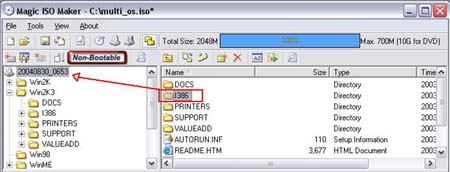
2. Click
button
to rename i386 to i2K3.

-
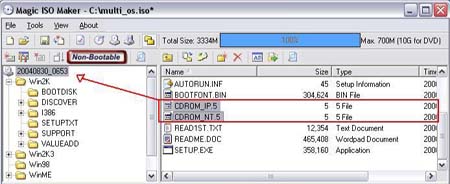
Copy the file "\Win2K\CDROM_IP.5" and
"\Win2K\CDROM_NT.5" to root directory.
Hold the CTRL key down, and use mouse to drag the files
"\Win2K\CDROM_IP.5" and "\Win2K\CDROM_NT.5" to root.
-
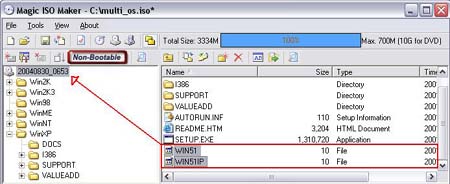
Copy the file "\WinXP\WIN51" and "\WinXP\WIN51IP" to
root directory.
Hold the CTRL key down, and use mouse to drag the files "\WinXP\WIN51"
and "\WinXP\WIN51IP" to root.
-
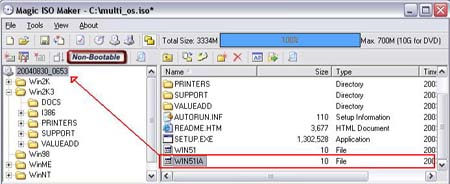
Copy the file "\Win2K3\WIN51IA" to root directory.
Hold the CTRL key down, and use mouse to drag the files
"\Win2K3\WIN51IA" to root.
-
Create "iW2K" folder into "c:\boot_os"
-
Extract "\iW2K\SETUPLDR.BIN" file to "c:\boot_os\iW2K".
1. Select "\iW2K\SETUPLDR.BIN" file.
2. Click
 button to extract the file to "c:\boot_os\iW2K".
-
Open "c:\boot_os\iW2K\SETUPLDR.BIN" with UltraEdit or
WinHex.
-
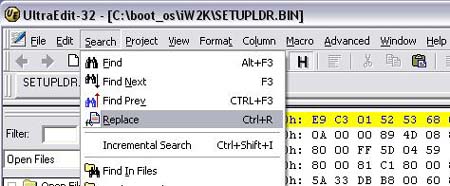
Replace all words "I386" with "IW2K"(Must be
capitalization).
1.Click "seach"->"Replace" menu item. Or Press "CTRL+R"
2. Input "I386" into "Find What". Input "IW2K"(Must be capitalization)
into "Replace With"
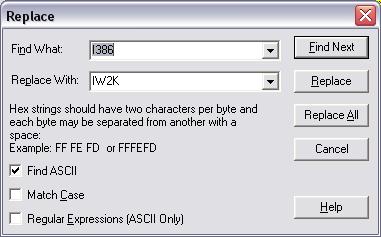
3. Click "Replace All" button.
4. Press CTRL+S to save the modified file.
-
Copy c:\boot_os\iW2K\SETUPLDR.BIN back to "\iW2K\SETUPLDR.BIN"
within c:\multi_os.iso.
-
Extract "\iW2K\TXTSETUP.SIF" file to "c:\boot_os\iW2K".
1. Select "\iW2K\TXTSETUP.SIF" file.
2. Click
button to extract the file to "c:\boot_os\iW2K".
-
Open "c:\boot_os\iW2K\TXTSETUP.SIF" with UltraEdit or
NotePad
-
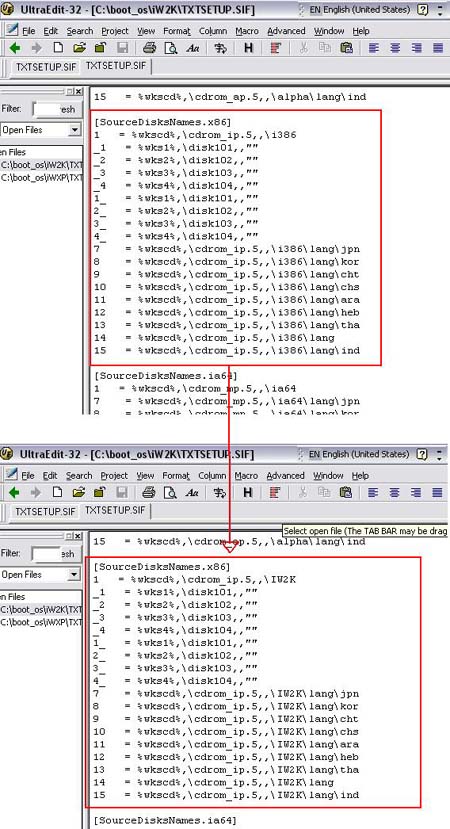
Replace all words "\i386" within the section
"[SourceDisksNames.x86]" with "\IW2K"
-
Copy "c:\boot_os\iW2K\TXTSETUP.SIF" back to "\iW2K\TXTSETUP.SIF"
within c:\multi_os.iso.
-
Create "iWXP" folder into "c:\boot_os"
-
Extract "\iWXP\SETUPLDR.BIN" file to "c:\boot_os\iWXP".
1. Select \iWXP\SETUPLDR.BIN file.
2. Click
button to extract the file to "c:\boot_os\iWXP".
-
Open "c:\boot_os\iWXP\SETUPLDR.BIN" with UltraEdit or
WinHex
-
Replace all words "I386" with "IWXP"(Must be
capitalization).
-
Copy c:\boot_os\iWXP\SETUPLDR.BIN back to "\iWXP\SETUPLDR.BIN"
within c:\multi_os.iso
-
Extract "\iWXP\TXTSETUP.SIF" file to "c:\boot_os\iWXP".
1. Select "\iWXP\TXTSETUP.SIF" file.
2. Click
button to extract the file to "c:\boot_os\iWXP".
-
Open "c:\boot_os\iWXP\TXTSETUP.SIF" with UltraEdit or
NotePad
-
Replace all words "\i386" within the section
"[SourceDisksNames.x86]" with "\IWXP"
-
Copy "c:\boot_os\iWXP\TXTSETUP.SIF" back to "\iWXP\TXTSETUP.SIF"
within c:\multi_os.iso.
-
Create "i2K3" folder into "c:\boot_os"
-
Extract "\i2K3\SETUPLDR.BIN" file to "c:\boot_os\i2K3".
1. Select \i2K3\SETUPLDR.BIN file.
2. Click
button to extract the file to "c:\boot_os\i2K3".
-
Open "c:\boot_os\i2K3\SETUPLDR.BIN" with UltraEdit or
WinHex
-
Replace all words "I386" with "I2K3"(Must be
capitalization).
-
Copy c:\boot_os\W2K3\SETUPLDR.BIN back to "\i2K3\SETUPLDR.BIN"
within c:\multi_os.iso.
-
Extract "\i2K3\TXTSETUP.SIF" file to "c:\boot_os\i2K3".
1. Select "\i2K3\TXTSETUP.SIF" file.
2. Click
button to extract the file to "c:\boot_os\i2K3".
-
Open "c:\boot_os\i2K3\TXTSETUP.SIF" with UltraEdit or
NotePad
-
Replace all words "\i386" within the section
"[SourceDisksNames.x86]" with "\I2K3"
-
Copy "c:\boot_os\i2K3\TXTSETUP.SIF" back to "\iWXP\TXTSETUP.SIF"
within c:\multi_os.iso.
-
Click
 button to save c:\multi_os.iso.
-
Open "c:\boot_os\boot2k.bif" with UltraEdit or WinHex.
-
Replace all words "I386" with "IW2K"(Must be
capitalization).
-
Open "c:\boot_os\bootxp.bif" with UltraEdit or WinHex.
-
Replace all words "I386" with "IWXP"(Must be
capitalization).
-
Open "c:\boot_os\boot2k3.bif" with UltraEdit or WinHex.
-
Replace all words "I386" with "I2K3"(Must be
capitalization).
